Nester clients managed their finances in fragments — reconciled by hand, one spreadsheet at a time.
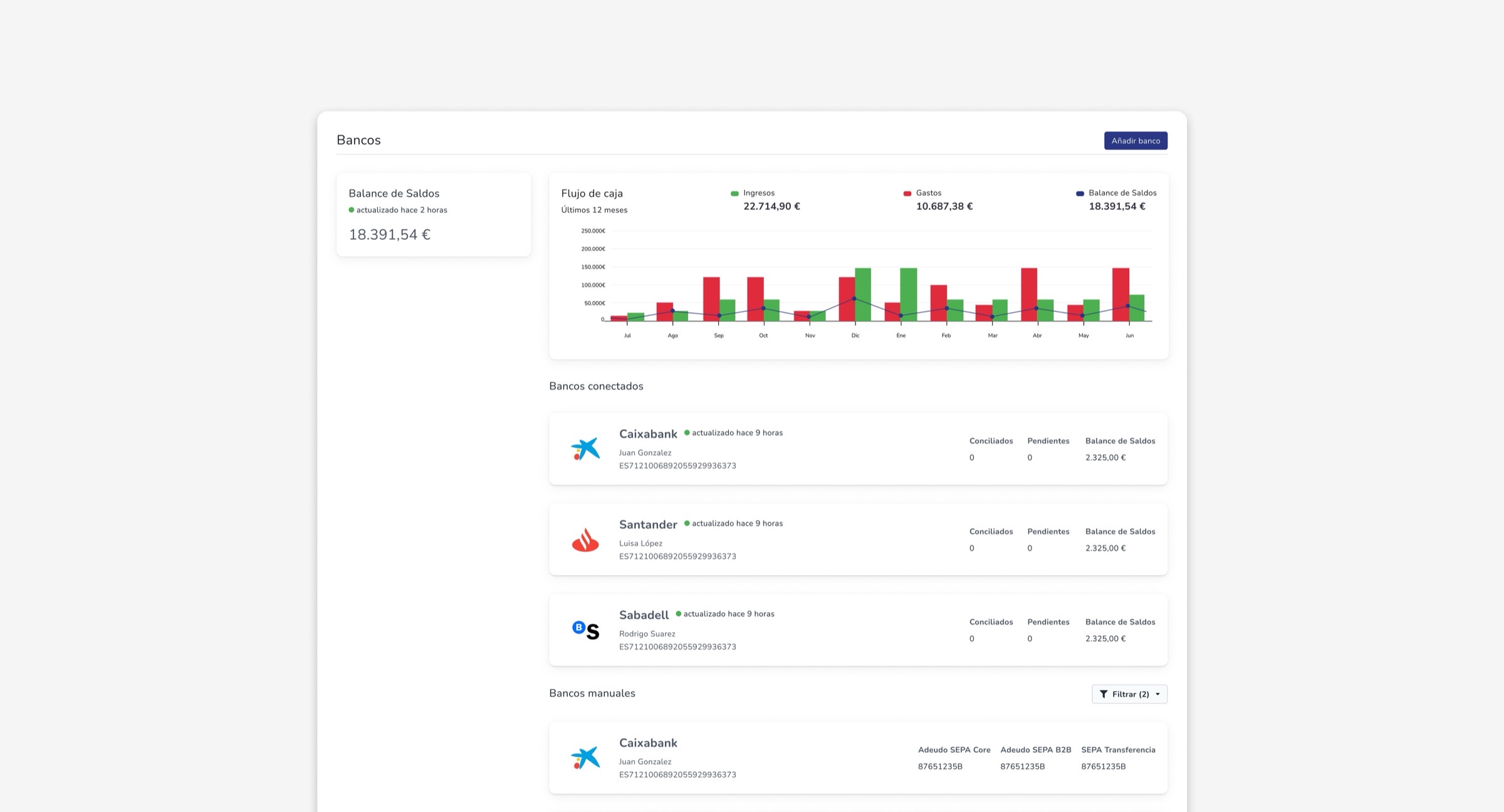
Comparing bank movements against invoices was slow and error-prone, and left managers without a real, up-to-date view of their cash flow. Without it, clients were exporting data or leaning on third-party tools just to close their books. We integrated with WealthReader to bring account aggregation directly into Nester.
A feature big enough to break into three.
Automating without any real data
The end goal was automatic reconciliation, but designing that matching logic before seeing a single real transaction meant building rules on assumptions — what a "typical" payment description looked like, how often edge cases occurred — instead of on actual patterns.
Three phases, not one big bet
Instead of shipping automation as one large, uncertain block, the team split the build: connect and view first, manual matching second, automation last — once there was real transaction data to design it from.
Let real usage teach the system, before asking it to think for itself.
Designing for data you don't have yet
The phased rollout doubled as a research strategy. Shipping read-only bank connection first meant Nester could observe real transaction typology before Phase 3's automated rules were ever defined.
A match that has to be exact, not close
Manual reconciliation was designed as a two-table, master-detail workspace: bank movements on the left, unmatched Nester records on the right. A live summary calculates the gap between the two selected amounts — the "Conciliar" button only activates when that gap is exactly €0.00, so an approximate match can't quietly corrupt the books.
The case nobody had modeled yet
Partway through, we designed for what happens when a bank deposit is larger than the invoice it's matched against. The system detects the surplus automatically and lets the manager resolve it as tenant credit — auto-applied to the next invoice — or a rounding adjustment.
Three phases, each shipping something usable on its own.
Phase 1 — Connect and view
Bank linking through the WealthReader widget, a consolidated Treasury › Banks view with a 12-month cash flow chart, and a bank detail view with a searchable, filterable movements table.
Phase 2 — Manual reconciliation
A reconciliation status card (pending vs. reconciled, with a progress bar) as the entry point, the matching workspace itself, and a shortcut to create a missing expense or invoice directly from an unmatched movement — pre-filled and auto-reconciled on save.
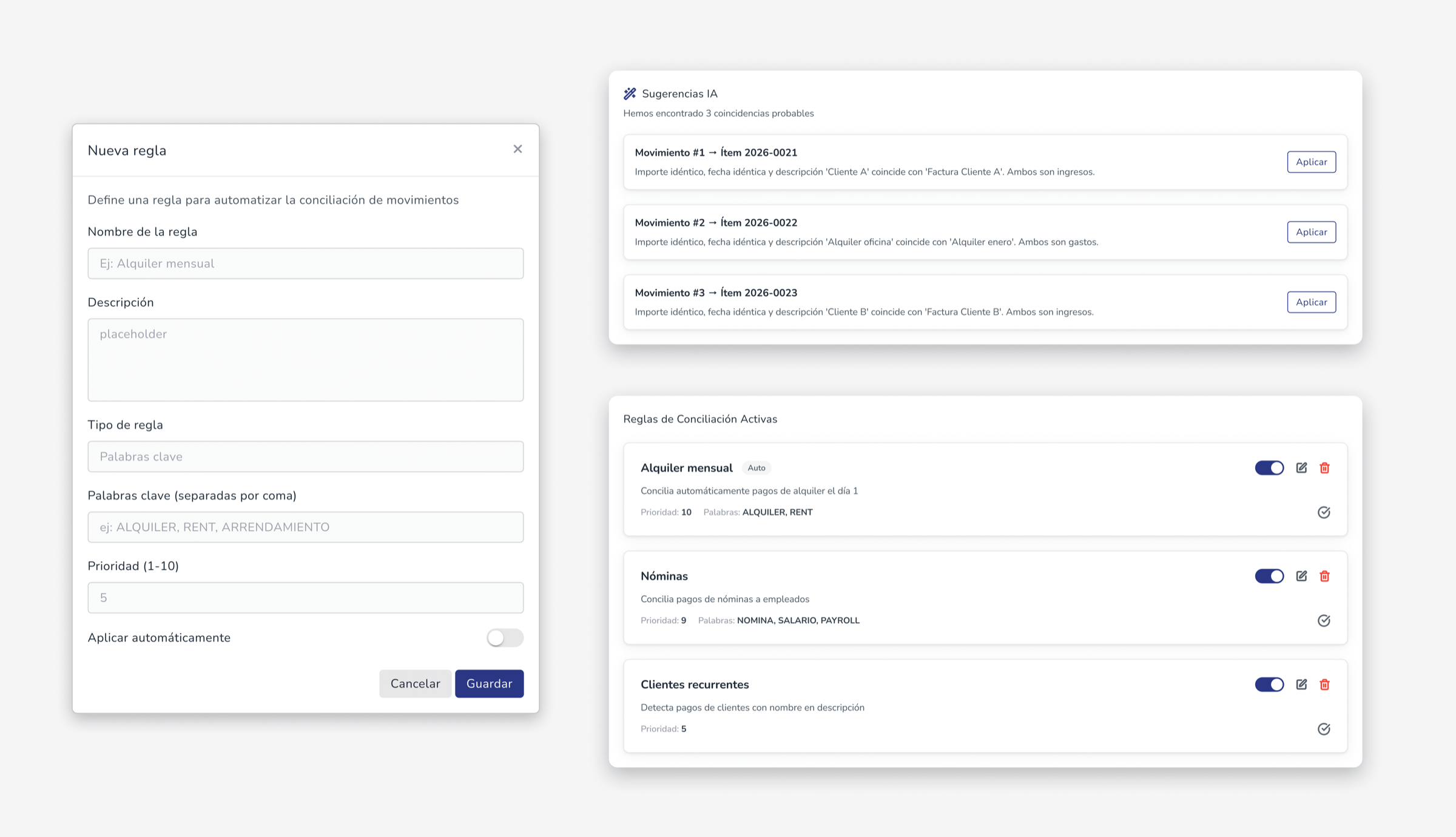
Phase 3 — Automation, designed but not yet built
Suggested matches based on amount, date, and description; configurable rules; automatic 1:1 reconciliation for high-confidence matches; and advanced reconciliation reporting.
Shipping under real pressure, without cutting the corner that mattered.
Holding the line on quality
Days before the planned Phase 2 release, the team flagged the payments logic wasn't fully derisked and pushed the date back a week rather than ship something uncertain — the deploy that followed was recognized internally as a genuinely hard one, done well.
What the live product surfaced
Reviewing Phase 2 in production surfaced gaps design review missed — the connected-bank cards were missing the same reconciled/pending counts already shown inside each bank's detail view. Logged for the next release, not a redesign.
What's still open
No defined flow yet for un-reconciling a payment when a bank charge is returned; permissions are Admin-only for the MVP, with a flexible roles system still to design; matching one payment against multiple invoices isn't scoped yet; and the confidence thresholds behind Phase 3's suggestions are still an open question.
Sequencing is a design decision, not just a scoping one.
Splitting the build into three phases wasn't about doing less — it was about refusing to design the hardest part, automation, from assumptions when real usage data was one phase away.